Layout websites around one goal for better inquiries
Learn how to layout websites around one clear goal so local clients know what to do and send better inquiries, bookings, and quote requests.

If your website feels busy, your visitors can feel busy too.
A potential client might land on your site between errands, while sitting in the car before school pickup, or while comparing three salons from her phone. She is not reading every word. She is trying to answer a few simple questions: Is this the right place for me? Can I trust it? How do I book or ask a question?
That is why it helps to layout websites around one main goal. Not five goals. Not a button for every possible action. One clear next step that matches what you actually want better clients to do.
For a waxing studio, that goal might be “book a Brazilian wax.” For a personal trainer, it might be “request a first session.” For an esthetician offering custom skin plans, it might be “send an inquiry before booking.” The details change, but the idea stays the same: your page should gently guide visitors toward the action that matters most.
What “one goal” means for a small business website
One goal does not mean your website can only talk about one thing. It means every section on the page supports one main action.
A nail salon can still show services, photos, reviews, policies, and location details. A skincare studio can still explain treatments, show before-and-after context where appropriate, introduce the esthetician, and answer common questions. But all of that should point toward the same next step.
Think of your website like the front desk of your business. If a new client walked in and asked, “What should I do next?” you would not hand them seven different flyers, ask them to follow you on three apps, and hope they figure it out. You would guide them.
Your website should do the same.
| Business type | Better main goal | Why it works |
|---|---|---|
| Waxing studio | Book an appointment | Most visitors already know the service they need and want a time slot. |
| Skincare studio | Request a consultation | Some treatments need more context before the right service is clear. |
| Lash artist | Book a full set or fill | Clients usually want to see style, pricing, and openings quickly. |
| Personal trainer | Ask about a first session | The trainer may need to know goals, schedule, and location first. |
| Creator or educator | Join a waitlist or buy one offer | The page can stay focused on a single launch or service. |
The goal should match the way you actually take clients. If you do not want strangers booking advanced treatments without a conversation, do not make instant booking the main action. If you are trying to fill your calendar with simple services, do not hide the booking link behind a long contact form.
Why too many choices lead to weaker inquiries
Many small business websites try to be helpful by including everything at once. There is a booking button, a contact button, an Instagram icon, a newsletter signup, a long menu, a pop-up, a free guide, a phone number, and maybe a “learn more” button under every section.
The problem is not that those things are bad. The problem is that they compete with each other.
When visitors see too many next steps, they often choose the easiest one, which might be leaving the site, sending a vague message, or heading to Instagram and forgetting why they came. That can lead to inquiries like “How much?” or “Do you do facials?” even though the answers were technically on the site.
A clear layout helps prevent that. It puts the right details in the right order, so clients feel ready before they reach out.
For local service businesses in Los Angeles, this matters even more because people are often choosing based on convenience, trust, and fit. They want to know your neighborhood, parking situation if relevant, price range, service style, and whether you understand what they need. If those answers are scattered, the inquiry gets weaker.
Start by choosing the best goal
Before moving sections around, choose the one action you want from the page. This is not always the action that sounds best. It is the action that creates the best next step for your real client.
If you are a newer business with open spots, your goal may be direct booking. If you are fully booked but want better-fit clients, your goal may be a short inquiry form. If you offer higher-touch services, your goal may be a consultation request.
Here are a few honest questions that can help:
- Do clients need to talk with you before choosing a service?
- Are your prices simple enough for people to book without asking first?
- Do you want fewer DMs and more organized requests?
- Are no-shows or wrong-fit bookings a current problem?
- Is this page for one offer, one service category, or your whole business?
If your page is for one clear offer, a focused service landing page design that makes booking feel easy may work better than sending people through a full website. If your page is part of a larger site, the same rule still applies: each page should have one main job.
Build the page in the order your client needs
A strong layout is not just about what looks nice. It is about answering questions in the order your visitor is likely asking them.
At the top of the page, say what you do, who it is for, where you are, and what to do next. This is not the place for a clever line that only makes sense after someone reads the whole page. A first-time visitor should understand your business quickly.
After that, show enough trust to make the next step feel safe. This could include client reviews, photos of your space, a short note about your experience, or a few details about your approach. Then explain your services or offer in plain language. Keep the most important information close to the booking or inquiry button.
A simple order can look like this:
| Page section | What it should answer | Example for a local service business |
|---|---|---|
| Top section | What is this and who is it for? | “Brazilian waxing in Silver Lake for first-timers and regulars.” |
| Main action | What should I do next? | “Book your wax” or “Ask about your first visit.” |
| Trust details | Can I feel comfortable here? | Reviews, photos, training, years in business, studio vibe. |
| Services | Which option fits me? | A short list of popular services with clear names and starting prices. |
| Fit details | Is this right for my situation? | Who the service is for, what to expect, and any important limits. |
| Location and logistics | Can I actually get there? | Neighborhood, parking notes, hours, booking policy. |
| Final action | Am I ready to act now? | The same main button repeated with a friendly line. |
You do not need to make the page fancy. You need to make it calm, clear, and easy to follow.
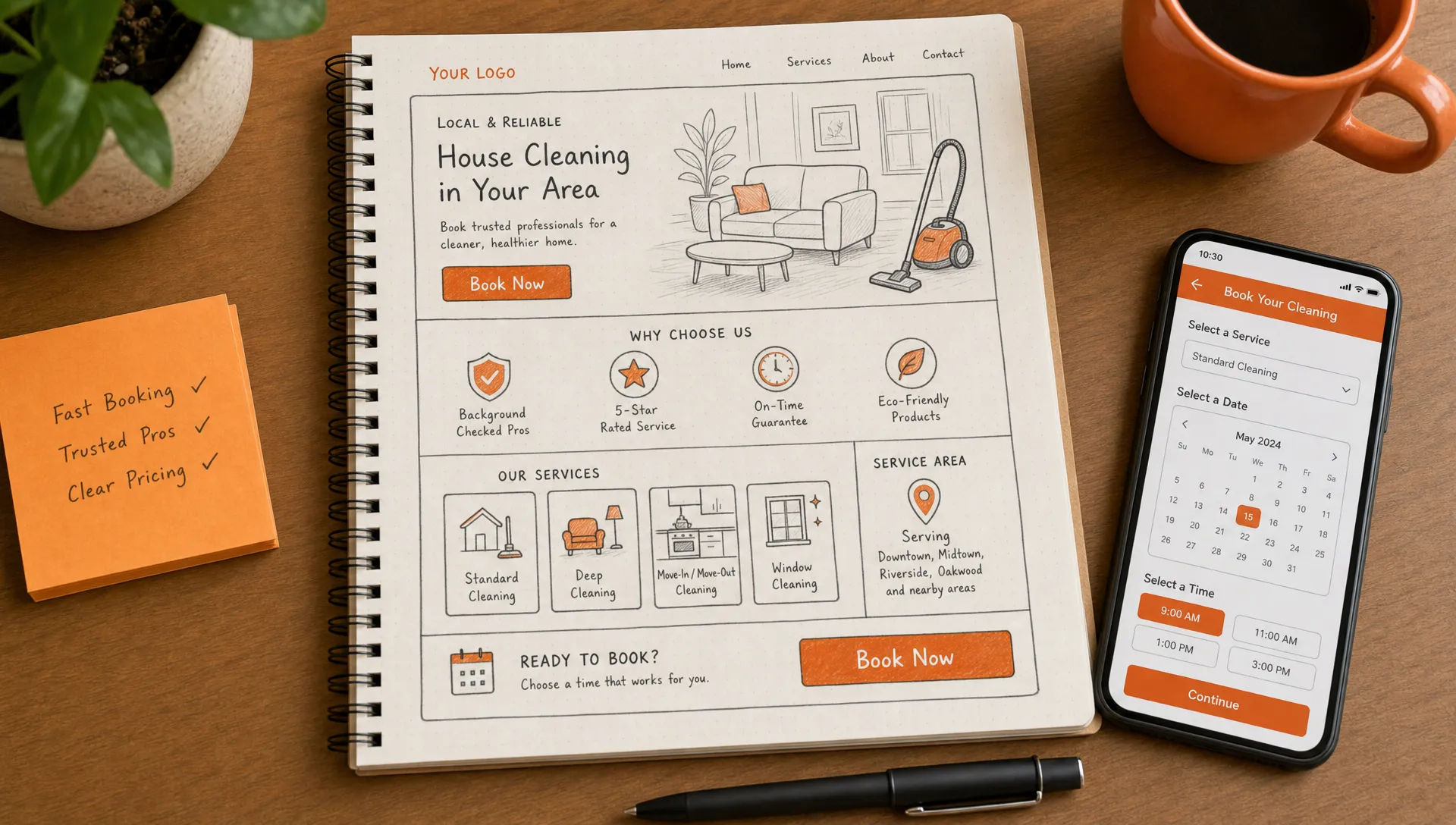
Make the main button easy to find
Your main button should show up more than once. Not in a pushy way, but in the places where a visitor naturally becomes ready.
For many service pages, that means a button near the top, another after the main service details, and another near the bottom after questions or policies. Use the same wording each time when you can. If one button says “book now,” another says “schedule,” and another says “start here,” visitors may wonder if those are different actions.
Plain button text is best. Try wording like:
- Book your appointment
- Request a consultation
- Ask about a first session
- Get a quote
- Join the waitlist
Avoid making your main button compete with social media links. Instagram can help people trust your work, especially in beauty and fitness, but it can also pull people away before they book. If Instagram is important, place it lower on the page or near your gallery, not as the main action at the top.
For a deeper look at section order and booking paths, this guide on website page layout tips for clearer paths to booking is a helpful next step.
Use your inquiry form to improve the inquiry
If your goal is better inquiries, your form matters just as much as your layout.
A form that only asks for name, email, and message puts all the work on the client. Some people will write too little. Others will write a long story but miss the one detail you need. A better form gently asks for the information that helps you reply well.
For example, an esthetician might ask about skin concerns, current routine, and preferred days. A personal trainer might ask about goals, injuries, neighborhood, and schedule. A web designer might ask about the type of page needed, timeline, and whether the business already has a domain.
The key is balance. Ask enough to understand the request, but not so much that the form feels like homework.
| Instead of asking only | Try asking |
|---|---|
| “Message” | “What service are you interested in?” |
| “How can we help?” | “What are you hoping to book or ask about?” |
| “Preferred time” | “Which days or times usually work for you?” |
| “Budget” | “Do you have a price range in mind?” |
| “Anything else?” | “Is there anything we should know before your visit?” |
This small change can cut down on back-and-forth. It can also help clients feel taken care of because the questions match the service they want.
Remove anything that distracts from the goal
Once you know the main goal, it becomes easier to decide what does not belong.
A long founder story near the top may be sweet, but if visitors need to book quickly, move it lower. A large gallery can be helpful, but if it pushes your service list too far down, choose the strongest photos and keep the rest for a separate page. A pop-up might grow a list, but if it covers your booking button on mobile, it may be hurting the action you care about most.
This is not about making your website cold or bare. Warmth matters. Your personality matters. But every part of the page should earn its spot.
Ask this for each section: does this help someone feel ready to take the main action?
If the answer is yes, keep it. If the answer is maybe, shorten it or move it lower. If the answer is no, remove it.
Sometimes traffic comes from places other than Google or Instagram. If you are testing whether people are already asking for your kind of help online, tools like Redditor AI for finding relevant Reddit conversations can point you toward those questions, but the page you send people to still needs one clear next step.
Match the goal to mobile visitors
Most local clients will see your website on a phone at least some of the time. A layout that feels clear on a laptop can feel cramped on mobile if the sections are too long, buttons are hard to tap, or the most important details are buried.
On mobile, your page should answer the basics quickly:
- What do you offer?
- Where are you located?
- What does it cost, or where do prices start?
- How do I book or ask a question?
- What should I expect after I send the form?
For a Los Angeles business, location clarity is especially important. “Serving Los Angeles” can be too broad if clients need to drive to you. If you are in Echo Park, Sherman Oaks, Koreatown, Santa Monica, or Long Beach, say that clearly. If you serve clients online or travel to them, say that too.
Small details can make the inquiry easier: parking notes, entrance instructions, cancellation policy, appointment length, and when you usually reply. You do not need all of those at the top, but they should be easy to find before someone commits.
Check whether the layout is helping
You do not need complicated tracking to tell whether your layout is working. Start with what you can notice in real life.
Are people asking questions that are already answered on the site? Are they booking the wrong service? Are they sending messages without enough detail? Are they dropping off after asking for pricing? Those are signs the page may need a clearer path.
Review your inquiries once a month and look for patterns. If three people asked where you are located, your location may need to be higher. If people keep asking whether you take new clients, say it near the booking button. If visitors send DMs instead of using your form, your form may be too hidden or too long.
A website is not finished forever after launch. It should grow with the way your clients actually book.
A simple one-goal website check
If you are not sure whether your page is focused, open it on your phone and give yourself 30 seconds. Do not scroll slowly. Use it the way a busy client would.
Then ask:
- Can I tell what the business does without guessing?
- Can I tell where it is or who it serves?
- Is there one obvious next step?
- Does the button wording match the action I want?
- Are prices, service options, or next steps easy to find?
- Do trust details appear before I am asked to book?
- Does anything pull me away from the main action too early?
If the answer to any of these is no, you have a clear place to start. You may not need a brand-new website. You may need a cleaner layout, better button placement, or a form that asks smarter questions.
You can also compare your site against common website page layout mistakes that make people leave early if you want to spot the issues that are easy to miss when you look at your own site every day.
Frequently asked questions
Should every page on my website have the same goal? Not always. Your whole website should support your business goal, but each page can have its own main action. A services page might lead to booking, while a contact page might lead to an inquiry form.
What if I want both bookings and inquiries? Choose the one that matters most for that page. You can still include the other option lower down, but the main button should match the action you prefer most visitors to take.
How many times should I repeat my booking button? Usually, a button near the top, one after the main service details, and one near the bottom is enough. The goal is to make it easy, not noisy.
Can a simple one-page website bring good inquiries? Yes, if the page answers the right questions and points to one clear next step. A one-page site can work well for a solo pro, single service, or focused offer.
Want your website to guide better inquiries?
If your current site feels scattered, outdated, or hard to use on a phone, you are not alone. Many small business websites started as “just get something up” projects, then grew messy over time.
Raine Archer designs warm booking pages, sales pages, and full websites for small businesses, salons, solo pros, and creators in Los Angeles. If you want a site that feels clear, calm, and easier for clients to act on, you can start with Raine Archer Web Studio.